
Discussion - Member to Member Sales - Research Center
Discussion - Member to Member Sales - Research Center

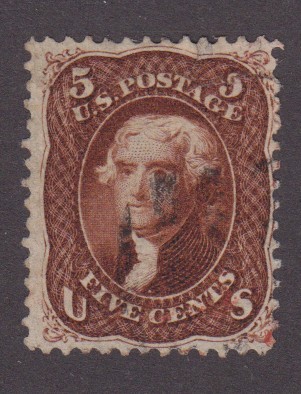
See scan

If I can do it anyone else can do it!

4 Members
like this post.
Login to Like.
What scanner settings produce these results? What brand and model of scanner? Not all scanners will have the same settings available.
Login to Like
this post
Canoscan LIDE 100.
I just play around until I get what I want. So I really can't tell you what setting!
Login to Like
this post
I use a Canon Lide as well (the 400), and scan normally. Then I use Image Sleuth to make it clearer. Or, I just use lighter fluid and a black tray!
Login to Like
this post
i use Microsoft Office Picture Manager - the easiest to use, most easily customized program around. In their infinite wisdom Microsoft discontinued it in 2013 but it is available as a standalone if you look hard enough per google. I copied mine off one of my old Win7 laptops I travel with. It finds watermarks even my SignoScope doesn't see (even with filters). And it works on Win11.
Login to Like
this post
Thanks, I'll look into it!
Login to Like
this post

Playing around various setting on my cheap scanner sometimes I can find the watermark!
See scan
If I can do it anyone else can do it!
4 Members
like this post.
Login to Like.
04:55:12pm
re: Using scanner for watermarks
What scanner settings produce these results? What brand and model of scanner? Not all scanners will have the same settings available.
Login to Like
this post
re: Using scanner for watermarks
Canoscan LIDE 100.
I just play around until I get what I want. So I really can't tell you what setting!
Login to Like
this post

re: Using scanner for watermarks
I use a Canon Lide as well (the 400), and scan normally. Then I use Image Sleuth to make it clearer. Or, I just use lighter fluid and a black tray!
Login to Like
this post
10:51:02pm
re: Using scanner for watermarks
i use Microsoft Office Picture Manager - the easiest to use, most easily customized program around. In their infinite wisdom Microsoft discontinued it in 2013 but it is available as a standalone if you look hard enough per google. I copied mine off one of my old Win7 laptops I travel with. It finds watermarks even my SignoScope doesn't see (even with filters). And it works on Win11.
Login to Like
this post
re: Using scanner for watermarks
Thanks, I'll look into it!
Login to Like
this post